AI-native project navigation
Don't manage tasks.
Navigate projects.
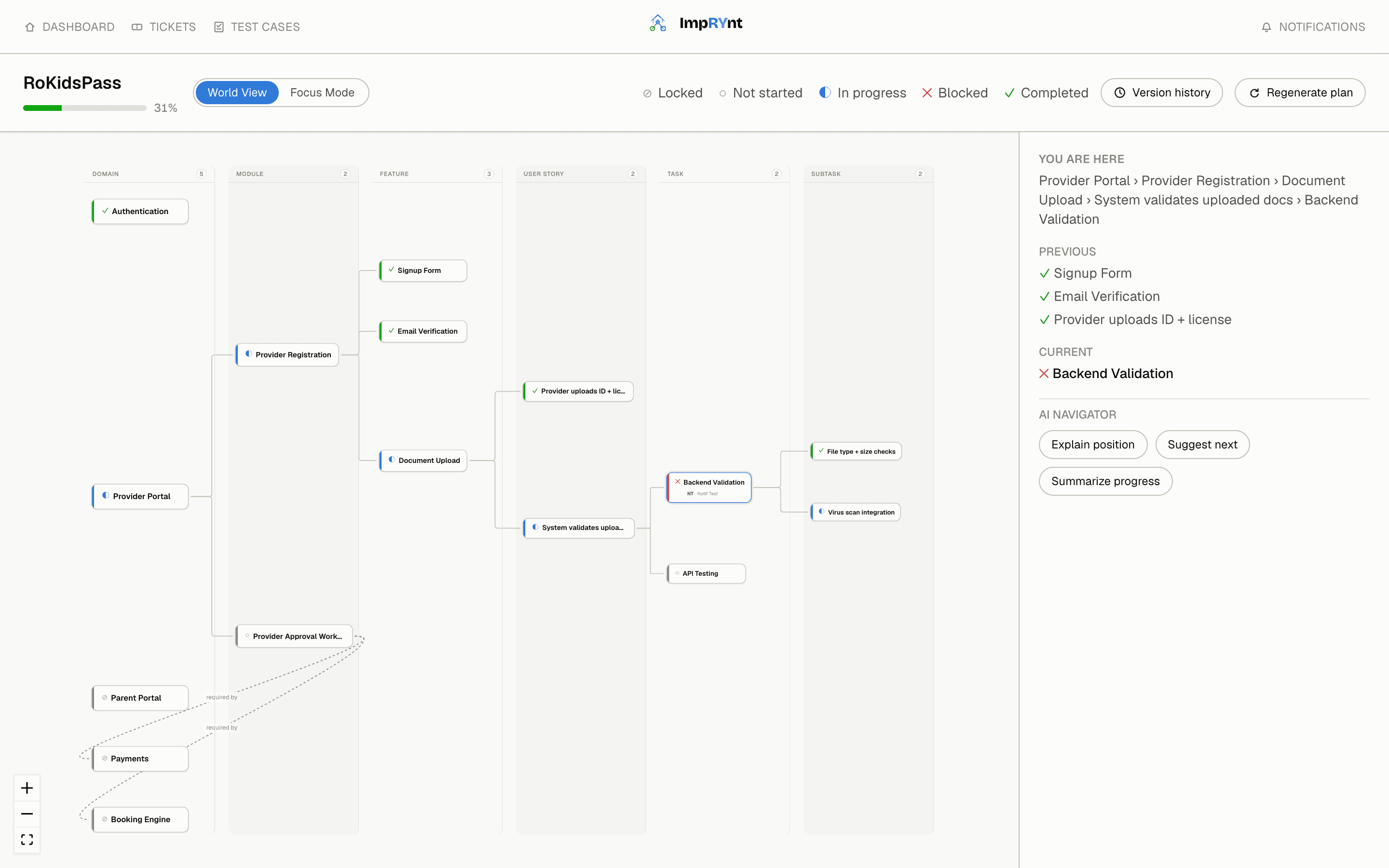
Describe what you're building and ImpRYnt's AI drafts the whole map — Domain down to Subtask — then stays on call as your Navigator, so your team always knows exactly where they are and what's next.
No more “where does this fit.”
Just “what's next.”
Most tools give you a list. We give you a map.
A task list
Tells you what's left. It doesn't tell you where you are, why a task matters, or what it unlocks next.
ImpRYnt's World Map
AI-drafted from your brief in seconds, then kept current as you work. Shows the whole hierarchy at once, marks exactly where you're standing, and can explain either in plain language on demand.
What's actually in it
Grouped by what you're doing, not one long list — plan, navigate, and ship are different moments.
Plan
— go from a brief to a structureAI drafts the whole map
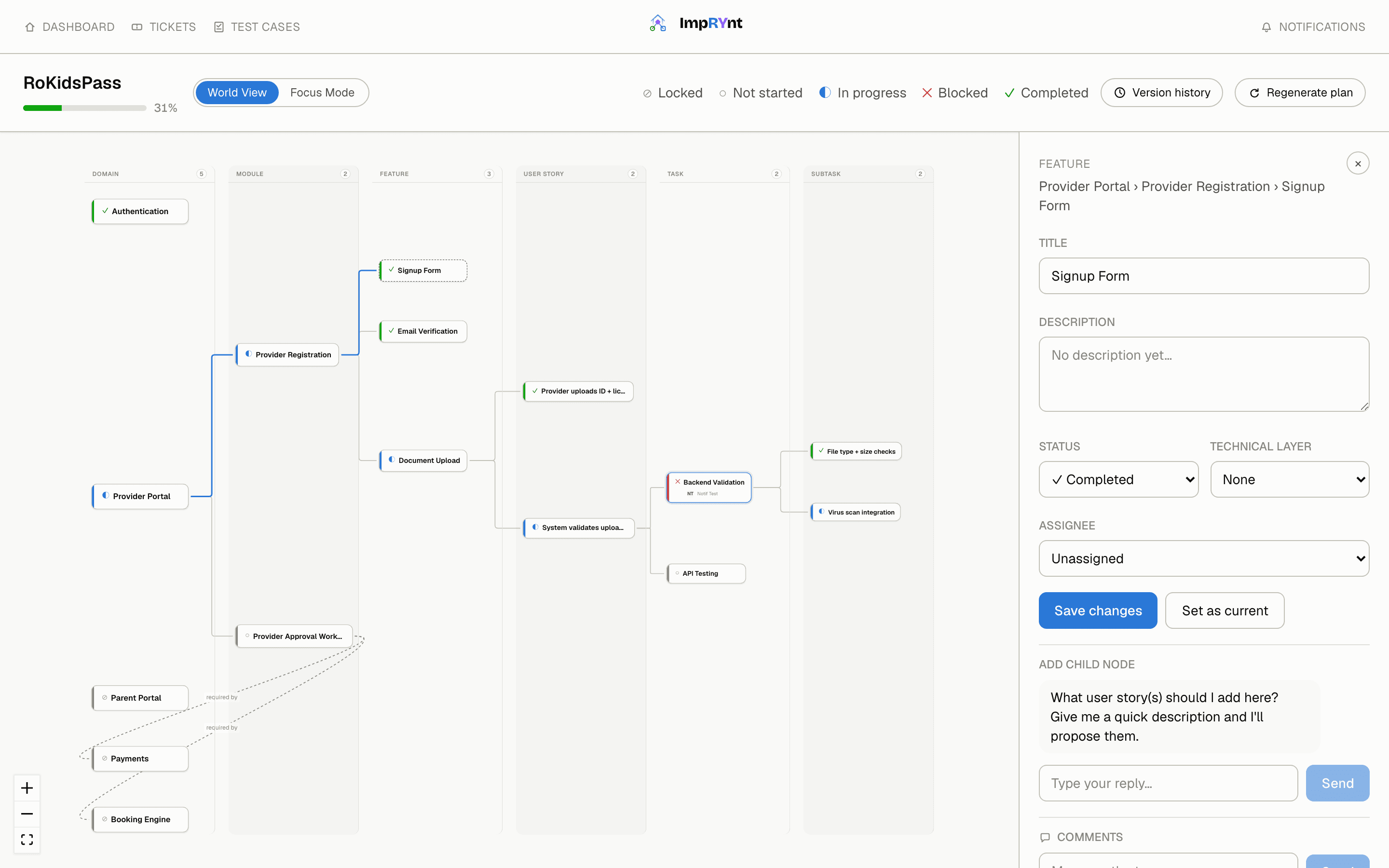
Describe the project and the AI proposes the full Domain → Module → Feature → User Story → Task → Subtask hierarchy in seconds.
Plan history
Regenerate the map with AI or hand-edit it without fear — every version is saved and restorable, and every change is logged with who did what.
Team & roles
Invite teammates with a link, assign Owner / Admin / Member, and keep AI provider keys — Claude, ChatGPT, or Gemini — scoped per organization.
Public showcase
Flip a project public and it's listed right on ImpRYnt's homepage, linking straight to wherever you've actually deployed it.
Navigate
— always know where you areWorld Map
See the whole project as one navigable map instead of a buried sidebar tree, with a completion bar so progress is visible at a glance.
You Are Here
One current-position marker and a visited trail, so “what was I doing” is never a scavenger hunt through old tickets.
AI Navigator
Ask what a ticket means, what to do next, or how far along things are — answered by AI in context, from wherever you're currently standing in the map.
AI implementation prompts
Generate a ready-to-paste prompt for your coding assistant, scoped to the exact ticket you're working — no re-explaining the codebase from scratch.
Ship
— turn tickets into merged codeMilestone Map ships tickets itself
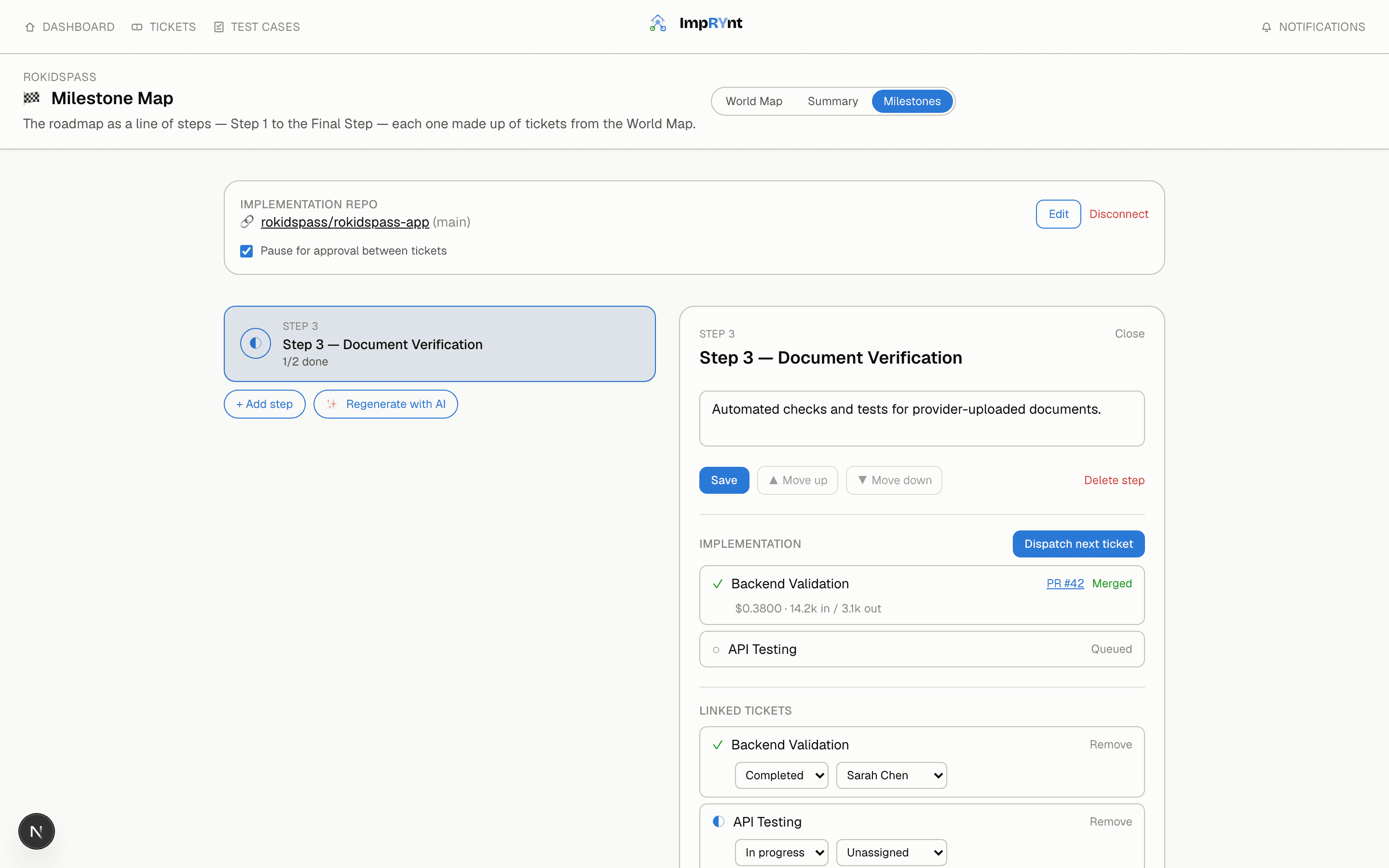
Connect a GitHub repo and the Milestone Map turns queued tickets into real pull requests — a coding agent opens the branch, writes the change, and auto-merges once its own tests pass.
Spend controls built in
Every agent run shows its cost and token usage. A pause-for-approval gate holds between tickets by default, and all-time spend per project is right on the Dashboard.
Tickets & ownership
Every node is a real ticket — status, technical layer, assignee. No repo connected? Set status and assignee by hand on the Milestone Map instead — free, no AI required.
Milestone Map
Tickets that ship themselves
Connect a GitHub repo and the Milestone Map turns queued tickets into real pull requests — a coding agent opens the branch, writes the change, and auto-merges once its own tests pass. Cost and token usage are tracked per ticket, and a pause-for-approval gate holds between tickets by default so a milestone can never spend more than you noticed.
No repo connected, or don't want AI touching this one? Every ticket also has a plain manual status and assignee, right there on the same map.
Ticket detail
Every ticket comes with its own AI
Open any ticket and the AI is right there — propose child tickets from a one-line description, generate an implementation prompt scoped to that exact piece of work, or ask the Navigator what it means and what's next. No separate tab, no re-explaining context.
From brief to map in three steps
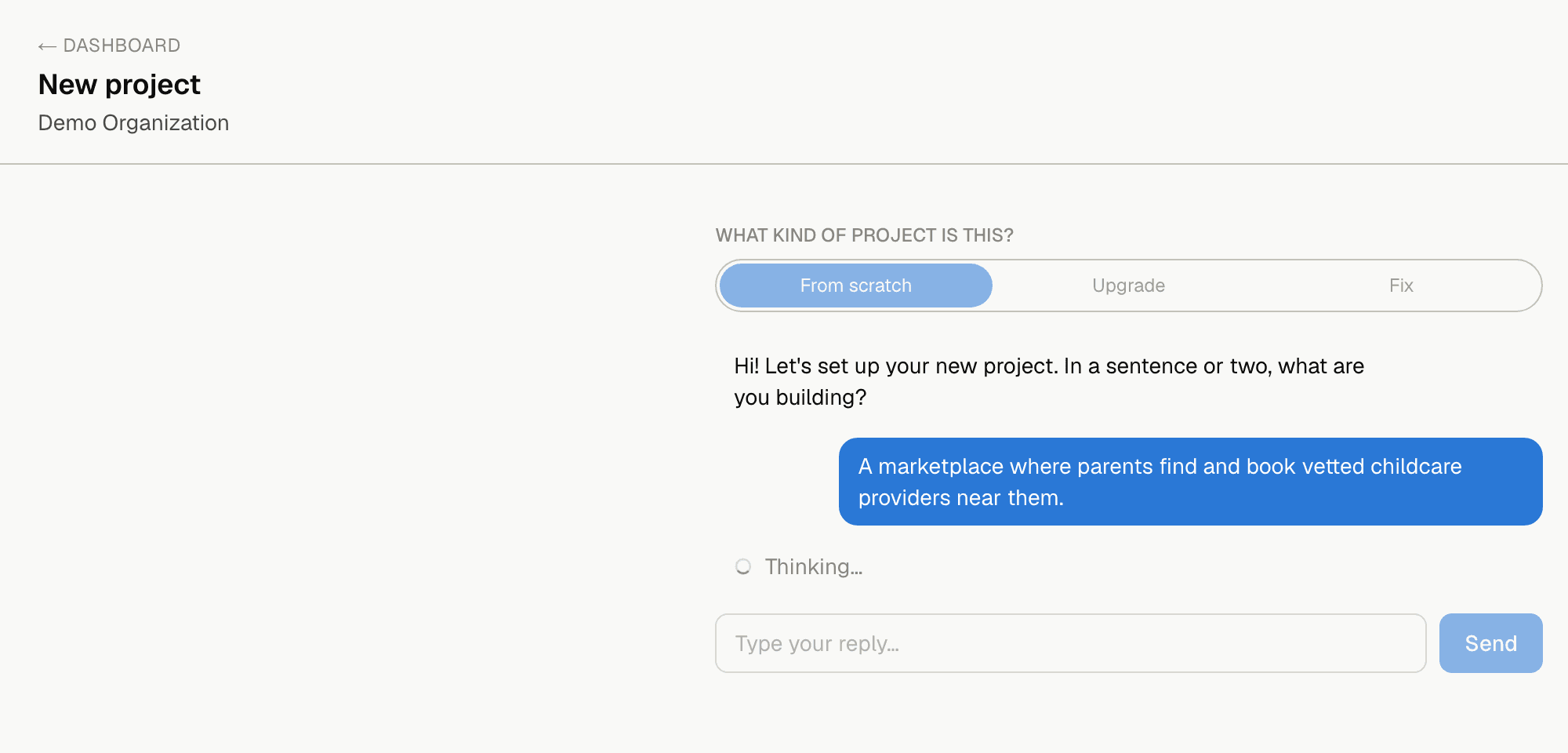
Describe the project
Name, description, and the areas it needs to cover.
AI drafts the map
Claude, ChatGPT, or Gemini generates the full hierarchy in seconds.
Navigate and ship
Move through the map, assign tickets, track status, ask the Navigator.
New here? Read the full onboarding guide.
A step-by-step walkthrough — create your organization, draft your first project with the AI, invite your team, and work your first ticket.
Simple pricing, no surprises
Start free. Upgrade when your team outgrows it.
Free
For solo builders getting started
$0forever
- 1 project
- Up to 3 team members
- World Map & You Are Here navigation
- Bring your own AI provider key
- Community support
Enterprise
For organizations that need more than one project
Custom
- Unlimited projects & team members
- Full AI Navigator — Claude, ChatGPT, or Gemini
- Milestone Map AI implementation pipeline
- Test cases, plan version history & restore
- SSO / SAML
- Dedicated onboarding & custom SLA
- Invoice billing
Frequently asked questions
Do I need my own AI provider key to use ImpRYnt?
No — every organization gets working AI access out of the box. You can add your own Anthropic, OpenAI, or Google AI key later under Settings if you'd rather use your own billing and rate limits; ImpRYnt falls back to its shared keys whenever an organization hasn't set one.
Which AI providers are supported?
Claude (Anthropic), ChatGPT (OpenAI), and Gemini (Google AI). You pick per-organization, and can switch providers for any individual chat or Navigator request.
Is my organization's data visible to other organizations?
No. Projects, tickets, comments, and AI provider keys are all scoped strictly to the organization that owns them — there's no cross-tenant visibility of any kind.
What's the difference between Owner, Admin, and Member roles?
Owner has full control including billing and can remove anyone. Admin can manage projects, tickets, and invite or manage members, but can't remove the Owner. Member can view everything and work tickets assigned to them.
Can I regenerate a project's plan without losing my work?
Regenerating replaces the entire node tree, so anything completed or hand-edited is lost from the live map — but every regeneration is saved as a version first, and Version history lets you inspect or restore any previous one.
Does ImpRYnt actually write and ship the code, or just plan it?
Both. The AI drafts and navigates the plan either way. Connect a GitHub repo on the Milestone Map and it can also implement queued tickets itself — opening a PR and auto-merging once tests pass — with cost shown per ticket and a pause-for-approval gate between them. No repo, or a ticket you'd rather handle yourself? Set its status and assignee by hand instead, no AI or GitHub required.
How is this different from a tool like Jira or Trello?
Those give you a list of tickets. ImpRYnt gives you the map those tickets live on — the full Domain-to-Subtask hierarchy, visually, with a You Are Here marker — so "where does this fit" and "what's next" don't require digging through a backlog.
Can I try it before paying?
Yes — the Free plan covers one project and up to three teammates indefinitely, no credit card required. Need more than one project? Reach out about Enterprise.
How do I get help if I'm stuck?
Message us on WhatsApp for the fastest reply, or use the chat bubble in the corner of any page or the contact form below — all three go straight to the team. There's also a full onboarding guide covering setup end-to-end.
So, what are we navigating?
Get startedGet in touch
Questions about a plan, a feature, or Enterprise? Send a message and we'll reply directly, or message us on WhatsApp for a faster answer.
Message us on WhatsApp